
QEMU Setup
Install Dependency package
sudo apt update

sudo apt install -y build-essential git bc bison flex libssl-dev libelf-dev

sudo apt install -y cpio rsync file wget unzip qemu-system-x86 qemu-utils

sudo apt install -y qemu-system-gui qemu-system-common qemu-system-data

sudo apt install -y libncurses-dev python3
Create a workspace
mkdir -p ~/kernel-lab
cd ~/kernel-lab
Download Buildroot
cd ~/kernel-lab

git clone https://github.com/buildroot/buildroot.git
or use a stable release:
wget https://buildroot.org/downloads/buildroot-2026.02.tar.gz
tar xf buildroot-2026.02.tar.gz
mv buildroot-2026.02 buildroot
Configure buildroot
cd buildroot
make qemu_x86_64_defconfig
Add custome config
make menuconfig
Enable Qemu VFS
Host utilities  --->
    [*] host qemu
         [*] Virtual filesystem support
Enable SSH
Target packages  --->
    Networking applications  --->
         [*] dropbear
Save and Exit.
Enable the 9P client support in the Linux kernel.
This support need to be added with kernel, so open kernel menuconfig
make linux-menuconfig
make following changes
[*] Networking support  --->
    <*>   Plan 9 Resource Sharing Support (9P2000)  --->
        <*>   9P FD Transport (NEW)
        <*>   9P Virtio Transport
File systems  --->
    [*] Network File Systems  --->
        <*>   Plan 9 Resource Sharing Support (9P2000)
        [*]     9P POSIX Access Control Lists
        [*]     9P Security Labels
Save and Exit.
Compile buildroot
make -j$(nproc)
NOTE: it will take approx 30min to 1 hours to build depending on your system configuration.
check output
After a successful build, you'll have a new directory: output/
inside it:
output/
├── build/
├── host/
├── images/
├── staging/
└── target/
Here's what they contain:
build/ – Temporary build directories for each package.
host/ – Tools built for your Ubuntu host (including the cross-compiler if Buildroot builds one).
target/ – The target root filesystem before it's packaged.
images/ – The final bootable kernel and root filesystem images.
boot linux on qemu
bydefault, buildroot will generate a script to boot images on qemu, so we need to just run the script
./output/images/start-qemu.sh
after runnung, you will see linux booting logs on qemu and finaly
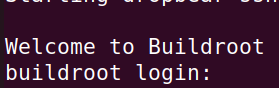
Now type root to login.
Configure
set password
bydefault there are no password for root user so lets set a password, i will suggest to use root as password to avoid confusion.
on linux qemu terminal, type passwd and then type root and press enter, again it will as for password so type root and then press enter.
enable hostfwd
so for ssh login to linux running on qemu, we need to enable some configuration.
so modify ./output/images/start-qemu.sh and make below changes
-net nic,model=virtio -net user,hostfwd=tcp::2222-:22 ${EXTRA_ARGS} "$@"
Share a host folder
-virtfs local,path=/media/vishal/data/qemu/modules,mount_tag=hostshare,security_model=none,id=hostshare
NOTE: change /media/vishal/data/qemu/modules based on your host shared directopry path.
login to linux(running in qemu)
ssh root@localhost -p 2222
Exit from qemu
poweroff
Mount host share automatically at boot (optional)
If you want the shared folder to be mounted automatically when the guest boots,
login to qemu and create
mkdir -p /mnt/host
and add below entry to /etc/fstab
hostshare /mnt/host 9p trans=virtio,version=9p2000.L,_netdev 0 0
Importent location
Linux kernel source code: output/build/linux-
©2023-2024 rculock.com